
Love it or loathe it, Facebook Business Pages remain a valuable tool for marketing your small business online. They give you access to useful insights, marketing tools and a way to connect with your target audience for free. One of the most important Facebook Business Page tips is to post consistently, but we know that’s not always easy when you’re a small business owner juggling everything from creating products to managing customers. That’s where a content plan comes in! Planning your posts in advance helps you stay consistent, save time and make the most of your Facebook Business Page without adding more stress to your already busy schedule.

Updated October 2026
Content Creation For Your Facebook Business Page
 Content awareness days Seasonal dates (Christmas, Mother’s Day, etc) Personal days (birthdays, school holidays, etc) Split your content don’t be too salesy Look at your Facebook memories: do you have some great content to reshare? Break down blog posts, i. 5 Tried And Tested Wedding Hacks To Save Money; each hack = one post, so this blog can run over 5 days randomly or in a row; it’s up to you Use the scheduling facility on the platform; it has a better reach
Tips for Facebook Business Page Follower Growth
 Don’t ask all your friends to click the 3 dots and invite all their friends to like your Facebook Business page

 You will fill your page with unengaged followers Unengaged followers can be detrimental to your page’s reach and engagement Confuses the algorithm It’s a waste of time
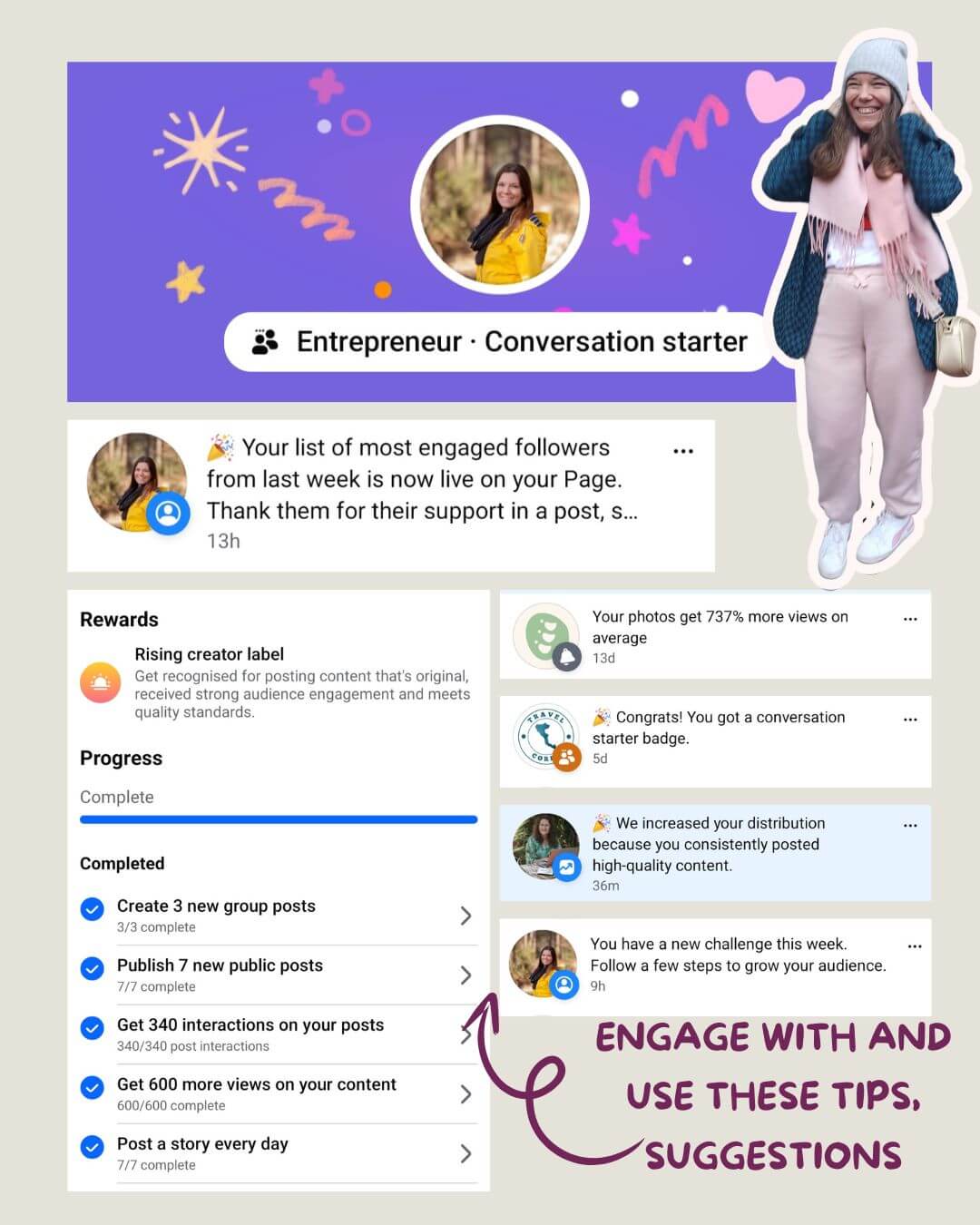
 Use the features within the professional dashboard designed for growth Complete the weekly challenges Engage with the tips and suggestions Write engaging content
Facebook Housekeeping: Claim Your Vanity URL
Struggling with visibility on Facebook, or noticing it’s hard for people to tag your page? You probably haven’t claimed your vanity URL.
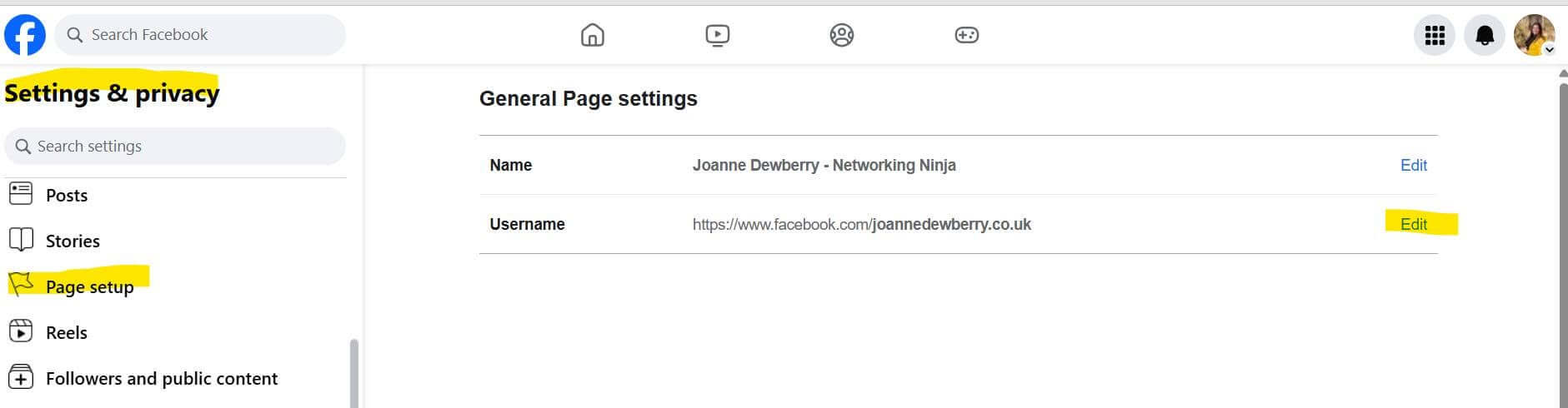
Go to your business page (desktop) and look at the toolbar; does it say facebook.com/YOURBUSINESSNAME or facebook.com/profile-12234?
If it’s the latter, do this!
- Log in to your Business Page
- Click Settings and privacy, then click Settings.
- Click Page setup.
- Click Name.
- Below General Page settings, click Edit next to your username.
- Update your username, then click Save changes.
- Done!
20 Facebook Business Page Tips to Increase Your Following
1. Like Your Facebook Business Page
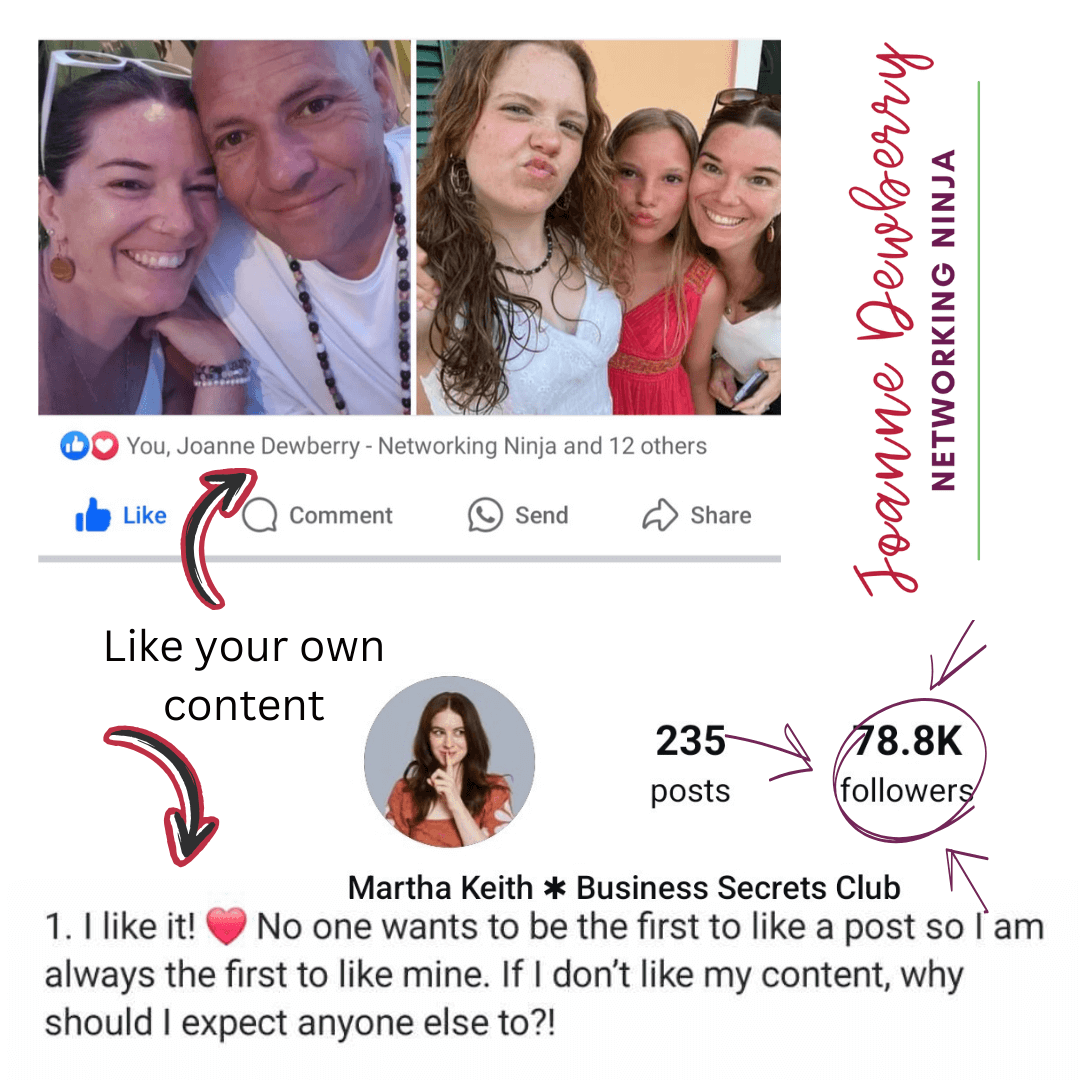
Sounds a bit narcissistic, but seriously, you should like your page and also like your content, as this helps with your reach. If you are looking to increase your visibility/reach on social media, then  LIKE your content (both as your business page and personal profile).


 because ya’know it feels icky.

 You start making your post visible; it starts the process of getting eyes on it.
 It validates what you are saying to your audience.
2. Pinned Posts
 Events tab Shop tab Welcome/about me post Latest blog Services Popular content Videos Competitions
It helps give your page context and keeps important information at the top.

3. Post Something!
This may sound like one of the most basic of Facebook business page tips, but you can’t expect people to interact with you if you aren’t posting.
Take a look at your insights and see what time of the day you get the most interaction.
Click on the reach section, this will change the order from chronological (date) to highest reach. From this, you can see your top posts.
What are they?
Status updates?
Images?
Video?
Replicate the content your users enjoy.
4. Engage With Your Audience
If someone has shared your post, then say thanks or reply to the comment they have shared. Always reply to comments and posts on your wall. Making followers feel valued will ensure they come back time and time again. Engagement is also a metric Facebook puts emphasis on.
Invite people to follow your Facebook Business Page; you don’t want people to like it who won’t interact or gain value from you. Having an unengaged audience is doing your analytics disfavour, you only want interested followers. Go through your last few posts to ensure everyone who has interacted likes the page. Wondering how to do this? Simply click on the likes/reactions for the post and a list of people who interacted will pop up. The list will have either INVITE or LIKE next to the name. If it says INVITE, then do it! This person has already shown an interest in the business, grab them! Or use your insights to find the top interacted posts (click on See More as the default only shows 5 posts, then click on Engagement to put the highest engaged on top. Click on post reactions which will open up a new window from there follow the same instructions to invite.)
5. Schedule Your Social Media
Scheduling your social media a month in advance;
Frees up headspace  Frees up time
 Keeps your content consistent Work smarter – not harder
6. Connect Your Personal Facebook Profile
Whilst I don’t share very often about my small business on my personal Facebook profile connecting your Facebook Business Page as your work information is a super useful tool.
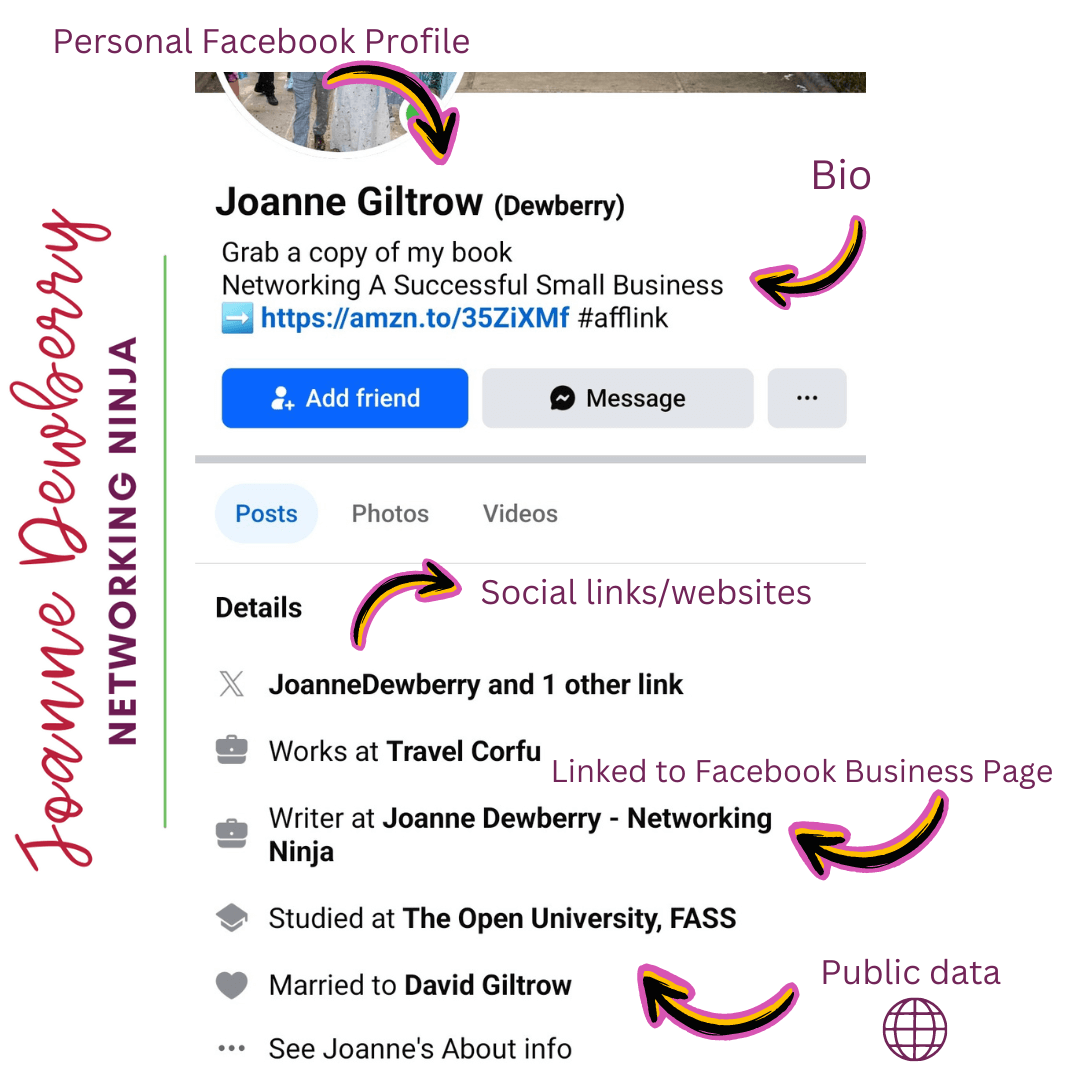
Via your personal profile in the “About” section, you can link to your Facebook Business Page in the work section. This link forms part of your public information, providing people with a way to contact/engage with you—it’s a clickable link.
Does your personal Facebook profile connect your Facebook Business Page as your workplace?
No?
This will take you 5 minutes! Go, go, go!
 = Public information
 = Private information only visible to you
Girl Knows Tech offers four more ways to promote or link your business or blog to your personal Facebook page.
7. Be Your Facebook Business
This is much easier to do now with Business Experiences. I started by following all the pages and groups I regularly interact with as my business profile (and then deleted them from my personal Facebook profile, making a distinct definition between working and playing on Facebook). Having this business content feed makes it easier to interact as your business and engage with the content you like, enjoy but also can add value to. It’s a great way to encourage readers to click on your profile image and check your business out.
8. Join In With # Hashtags
There are quite a few on Facebook that can make up most of your weekly content plan.
#ThrowbackThursday: why not post
a photo of your first product? First office? Anything from years ago, behind the scenes, works really well, as people like to see how your business has changed and grown.
Other tags include,
#TestimonialTuesday: share your latest customer review.
#WednesdayWisdom: share a tip/advice around your genre.
However, be wary of using too many hashtags in a post. 0-3 hashtags is the perfect amount for Facebook posts. Most people still ignore me when I say “don’t add that many hashtags”, especially when you have 10+, and they are words like #proud because you won a business award. Guys! Nobody is searching the word proud on Facebook!
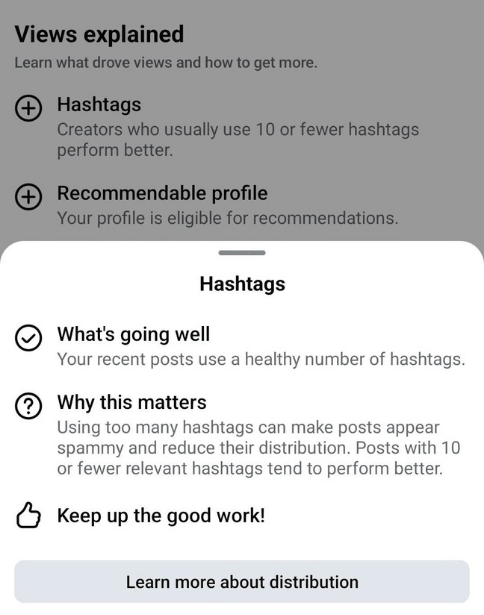
And your Professional Dashboard literally tells you … it looks spammy, plus posts using lots of hashtags do not perform as well!!
Rule of thumb for me when using hashtags:
- Does the hashtag make sense?
- Would I search for this keyword?
*cough* AI-assisted posts will add a load of unnecessary hashtags that make little sense!
9. Value-added Content: Share Someone Else’s Content
Value-added content: make sure the content is relevant, and it doesn’t hurt if it is already popular. If the content has lots of comments and likes, you know it will do well on your page. Sharing content is a great way to connect with others in a similar industry to you and provide advice and support from another point of view. Share using the URL, not the share button, though, as this has a higher reach.
10. Housekeeping
Check the About Us section. Have you filled in all the boxes? Are you using keywords in the description? Do you have an email and website address listed (you’d be surprised how many don’t)?
Did you know you can edit your Action Button and choose specifically where you send your followers?
✅ Want to grow your mailing list? Select “Sign up”
✅ Get more orders by using “View Shop”
✅ Use “Book Now” and add your booking link
The opportunities are endless (I couldn’t screenshot them all) you can do this on desktop and mobile.

11. Facebook Live
Facebook Live is the #1 tool for engagement on Facebook, and 100 million hours are watched every day! That fact is crazy! Plan what you want to say in bullet points; aim for 3 tips/points to get your message across, but don’t script, as people like the rawness of being live. Facebook Live increases your trust factor with your audience. You also have the added bonus of being able to promote live beforehand and add descriptions, titles, and thumbnails afterwards, plus you can download the video for use elsewhere or share the original. There are numerous options to keep your audience engaged long after you have finished talking.
12. Use Facebook Business Page Features
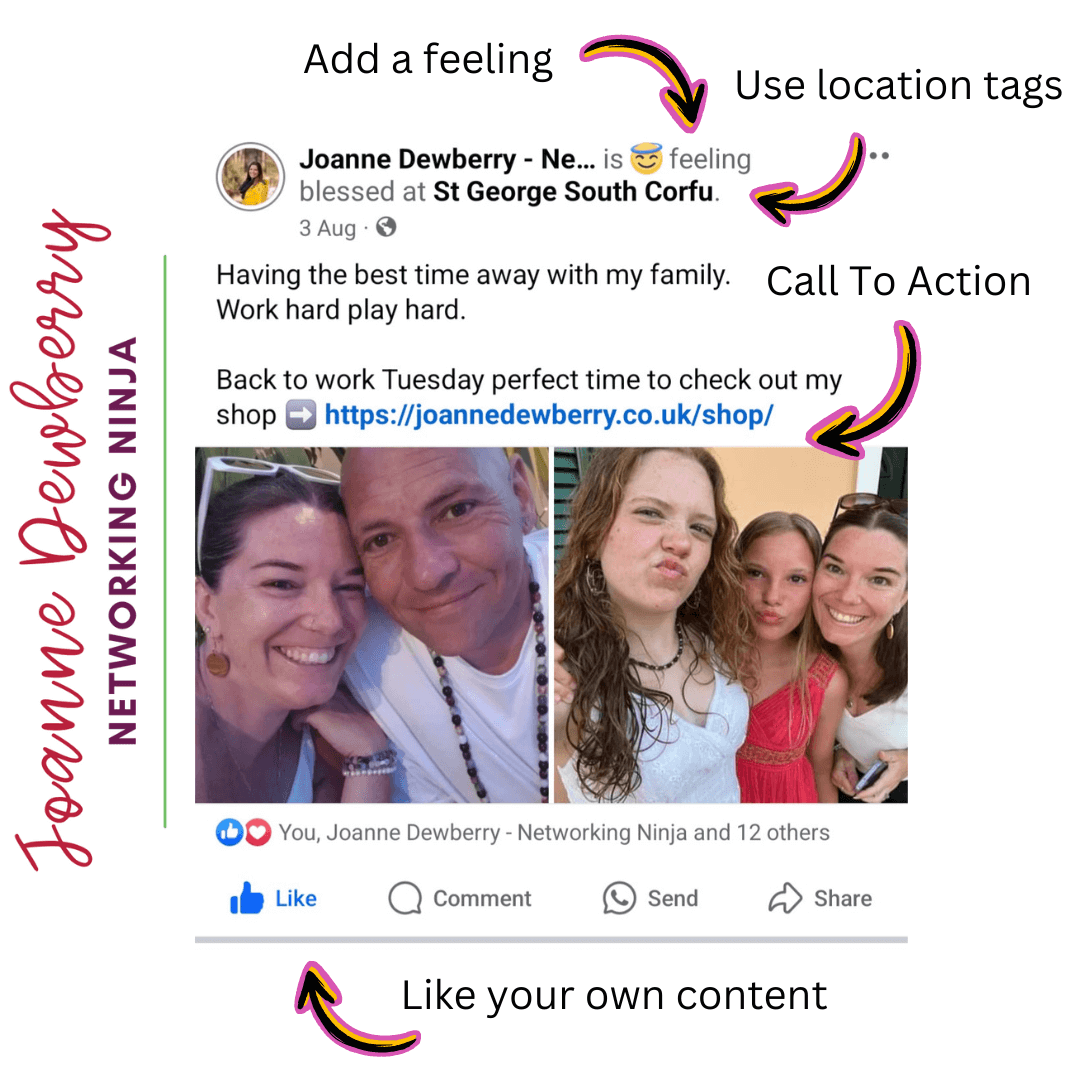
 Add a feeling
 Add your call to action
 Add a location Like your own content
13. Have You Listed Any Life Events?
I wouldn’t use ones like “reached 1000 followers!” Try making them more compelling and using them to build your brand and story. For example, “Taught my first silversmith course” or “Spoke at Lemur LinkUp Networking Group” or “Took my 1000th customer photos.”
14. Meta Suite Insights and Tips
 Use Meta Suite to see your popular content, times of day, target audience and organic reach. Set organic reach goals on Meta Suite for the next 28 days. Looked at how you can increase your organic reach.
15. Facebook Widget
Why not add a Facebook widget to your website? Website visitors can see your last few Facebook posts and like your business page without leaving your website.
16. Set up Facebook Authorship on WordPress
Great if someone shares your post on their page directly from your website, as a linked name is attached to any shares of that content on Facebook. This in turn allows viewers to see the author and potentially follow them. It’s also handy when you write for other WordPress sites; for example, shares on my Britmums Mums in Business Round-up are linked to my Facebook Business page as I’m the author.
17. Tag People/Businesses in Images
Not random people that’s just weird- but anyone relevant to the photo; it also encourages those people to share the experience with their followers or leave a comment; either way this helps with reach and visibility! Don’t forget to use the location tags too!

18. Reviews/Ratings Tab
Email ALL your previous customers today and ask them to please leave you a review. Reviews play a big role in building a brand, developing credibility and loyalty and improving customer service, but also for SEO (search engine optimisation). Reviews provide your customers with a voice and allowing them to express it increases customer engagement/interaction as well as loyalty. Both Facebook and Google favour businesses with reviews.
19. Events or Venue Check In
If you have this option open then check in to say where you are at work today. Encourage anyone else with you to check in too.
20. Utilising Offline Events
Develop a way to get potential customers to like your page, check in with you, or leave a review. This could be anything from a poster at your place of work or make it part of your sales pitch. “For news updates like me on Facebook”. Grab the customer’s data ie. email address in the form of signing up for my newsletter or entering a prize draw that way you can send out a follow on Facebook. (Just Facebook though try not to overwhelm potential customers with too many options or information.)
Let me know how you get on with trying out any of these Facebook Business Page tips to help you turbocharge your following.
This post complies with my Disclosure Policy