You have probably all had a chance to flick through the new insights and they are really excellent. Enabling you to see your audiences reached and by what means in a much clearer manner. I’m really putting myself on the line now showing you past results 😉 These are my hits from 3rd & 4th November 2011. I didn’t pick any specific days so these aren’t great results nor poor results just an average day 🙂
Reach – (if you hover over the Reach ? then the description will appear) The number of unique people who have seen your post. You can see on my screenshot that I reached between 60 -200 people with those 5 posts.

Post - Reach
Engaged Users – number of unique people who have clicked on your post. From the 5 posts below I had between 2 – 22 engaged users. I can see from the posts what kind of information interests my likers. Last week there on my Fanpage there was quite a heated debate about the Government stats regarding youth unemployment which had 62 engaged users. Using this information I can now tailor my posts to what interests my fans/likers.

Engaged
Talking – The number of unique people who have created a story from your post Stories are created when someone likes, comments or shares your post, answers questions or responds to events. These are the ones we like 😉 Our active users, those that like, comment and possibly share what we have to say. As you can see the posts here obviously weren’t very interesting 😉 with 0-3 people talking about it!! But if we go back to the debate last week (if you have read it via the link about you can see it was a bit feisty!) this post had 28 unique people talking about it. Again this gives me the information I need to tailor my status updates to benefit my audience.

Talking
Virality – percentage of people who made a story from those who have seen it – ie. the difference between the reach and talking about.
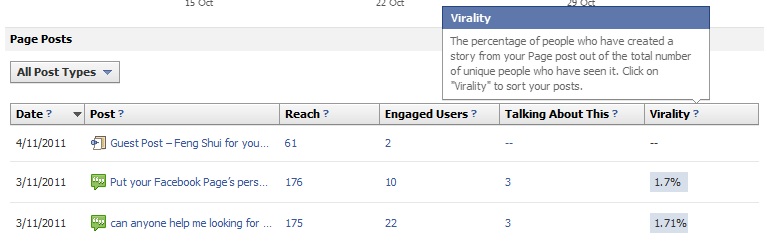
Virality
In this section of the insights you can click on any of the sections .. talking about, engaged etc … and put the posts in order of highest to lowest or lowest to higher.
All these screen shots were taken with the POST TYPE – in all posts you have the option to check your stats for just posts, photos, links etc ..

Tune in tomorrow for basic information on the other insights tabs.


1 Comment